
Zones and bypassing
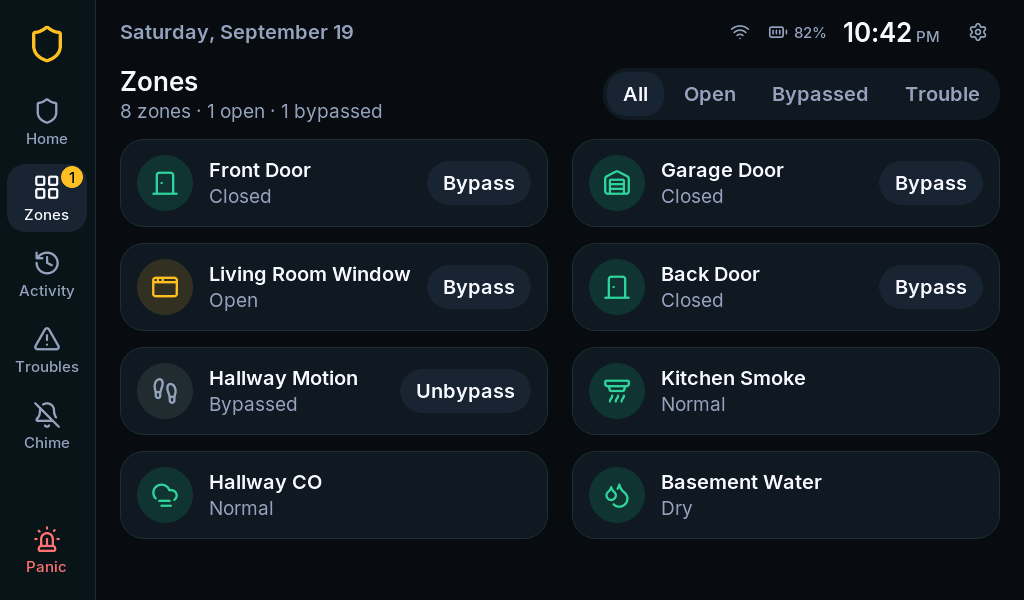
A zone is the named alarm input for a door, window, motion detector or other sensor. The zone’s name tells you where to look.
Find what is open
Section titled “Find what is open”- Select Zones on the left rail.
- Use the Open filter to find active sensors.
- Close the named door or window, or wait for a motion detector to clear.
- Check that the zone returns to normal, then return to Home.
Unreachable or CHECK is different from an open door: the panel cannot rely on the sensor’s current state. See sensor troubleshooting.
Bypass one zone
Section titled “Bypass one zone”Before you begin: disarm the system. A bypass intentionally leaves that zone out of the next armed period.
- Open Zones and find the zone.
- Select Bypass.
- Enter a code allowed to bypass and select the check mark.
- Confirm the zone shows Bypassed.
- Arm using your chosen mode.
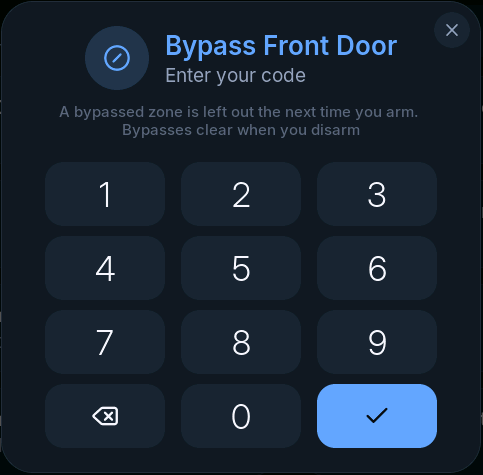
To put it back before arming, select Unbypass and authenticate. Bypasses clear when the system is disarmed; review them each time you arm.
Bypass open while arming
Section titled “Bypass open while arming”The arming code pad can offer Bypass open when zones are not ready. It bypasses eligible not-ready zones as part of the arming request. Review the zone list first: this may exclude more than one opening.
If an input cannot be bypassed, the panel can still refuse to arm. Fire, CO and 24-hour zones are not generally bypassable; a missing button is not a UI fault.
When to call the installer
Section titled “When to call the installer”Ask for help if a zone has the wrong name, reacts to the wrong sensor, repeatedly becomes unreachable, or uses the wrong alarm behavior. Renaming, source assignment and zone types belong in installer programming.