
Connect an MQTT broker
MQTT is an alternative connection for a broker-based setup. The native RoboAlarms Home Assistant integration does not require it.
Before you begin: obtain the broker host, port, credentials, TLS requirements and any required CA certificate from the broker administrator.
Configure the connection
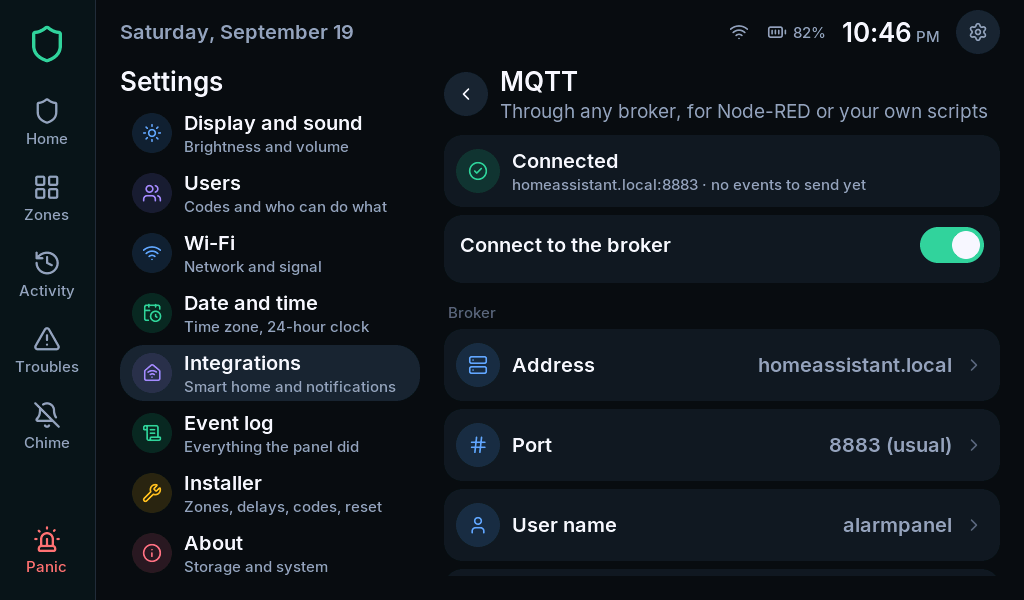
Section titled “Configure the connection”- Open Settings > Integrations > MQTT.
- Authenticate with the system master or installer code.
- Enter the broker host and port.
- Set username/password if required.
- Configure TLS and certificate settings to match the broker.
- Review the topic prefix and device identity.
- Enable MQTT and check its reported connection state.
Do not turn off certificate verification merely to suppress an error. Check the server address, trust configuration and panel time first.
Discovery and remote commands
Section titled “Discovery and remote commands”Home Assistant MQTT discovery is a separate option. When the native integration is paired, MQTT discovery is suppressed to avoid duplicate entities.
Remote commands have their own enablement and authorization rules. Publishing status to a broker does not automatically grant remote control. Only enable command handling when your broker permissions and intended clients are configured.
Verify
Section titled “Verify”Confirm the panel reports a connected broker and inspect the expected status messages from your intended client. Test authorized commands only during agreed commissioning.
If you are using the native integration and do not need a broker-based consumer, leave MQTT disabled; follow Connect Home Assistant instead.